The latest demos are built using the ElementsKit Header-Footer Builder. When this option is enabled, the default header and footer settings provided by the theme via the Customizer will no longer be applied.
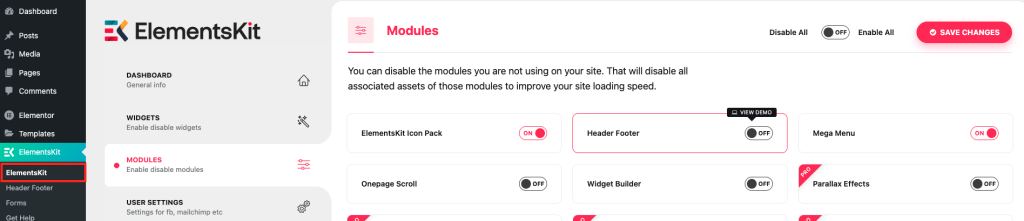
If you prefer to use the theme’s default header and footer, you can disable the ElementsKit header and footer by following these steps:
- Go to ElementsKit > ElementsKit > Modules.
- Turn off the Header Footer option.
- Click on the Save Changes button.
Once disabled, the theme’s default header and footer—controlled via the Customizer—will become active again.
Then, you can access the available theme default header layout options and settings from: Appearance > Customize > Header.
Note:
If the demo is designed with ElementsKit’s Header-Footer Builder, disabling it will revert your site to the theme’s default header & footer layout. This layout may look different from the demo, and customization options via the Customizer may be more limited compared to those available in the builder.